
You'll Need:
- An Otto Pro or higher subscription
- A Super User role
Use customer memory to help Otto recognise repeat callers, remember useful preferences, and give more personalised recommendations over time.
How customer memory works
When customer memory is enabled, Otto builds a memory for individual callers after each call.
Customer memory requires Otto to see the caller's phone number. If a customer calls from a private or hidden number, Otto cannot reliably connect that call to an existing customer memory.
Otto can remember details such as:
- The customer's name
- Customer preferences
- Dietary notes
- Their most recent order
- Useful notes from previous calls
Customer memory improves over time as Otto speaks with the same customer again.
How Otto Uses Customer Memory
Customer memory helps Otto make the call feel more familiar and useful for repeat customers.
If a customer has ordered three or more times, Otto can greet them by name. For example:
Welcome back, Gary. You've called Otto Pizzeria. How can we help you?
Otto can also use memory while taking an order. For example, if a customer has ordered gluten-free in the past, Otto may ask whether they would like their order on a gluten-free base again instead of treating it like a brand new preference.
Customer memory can also help Otto make smarter upsells and recommendations based on what the customer has ordered before.
Turn Memory On or Off
- Log in to Otto.
- Select Agents.
- Select the agent you want to update.
- Open the Settings tab.
- Find Customer memory.
- Turn customer memory on or off.
- Save the agent.
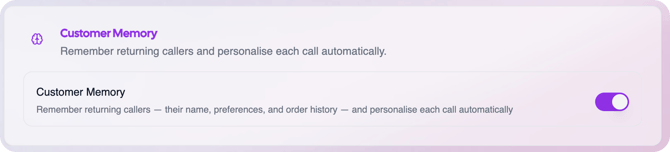
Once customer memory is turned on, Otto can start building memories for customers who call from identifiable phone numbers.
Access & Update Memories
Open the Memory page- In the left-hand navigation, find the Configure heading.
- Select Memory.
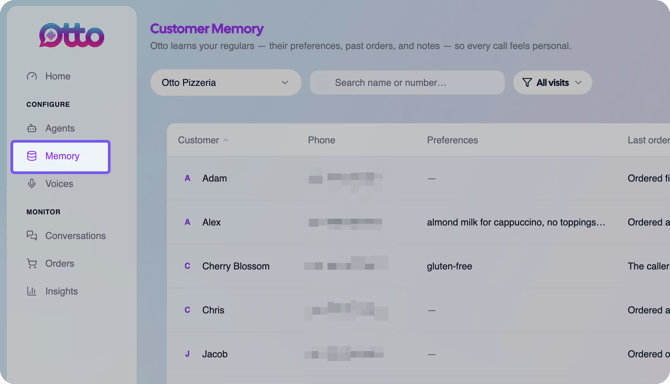
The Memory page shows customers who have saved memories.
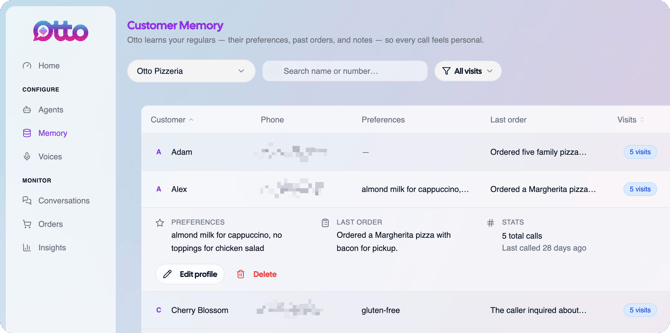
From this list, you can review details such as:
- Name
- Phone number
- Preferences
- Last order
- Number of visits
- Last call
Edit a customer memory
Use editing when you need to correct or add information to a customer's saved memory.
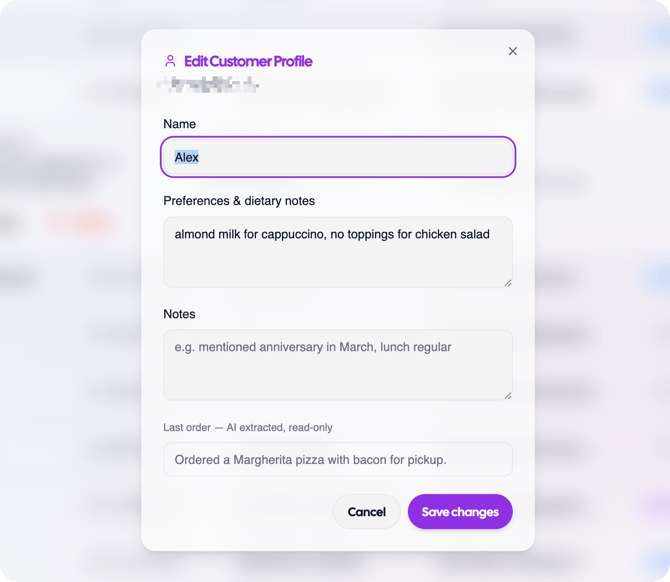
For example, you might update a customer's name if Otto misheard it, or add a dietary note that Otto should remember for future calls.
- Open the Memory page.
- Find the customer you want to update.
- Select the customer record to expand it.
- Review the customer's preferences, last order, and basic stats.
- Select Edit.
- Update the customer's name, preferences, dietary notes, or additional notes.
- Save the changes.
After you save changes, Otto can use the updated memory in future conversations with that customer.
Delete a customer memory
You can delete a customer memory when it should no longer be kept.
This can be useful if a customer asks you to remove the information Otto has remembered about them.
- Open the Memory page.
- Search for or find the customer record.
- Open the customer memory.
- Select Delete.
- Confirm the deletion if prompted.
Deleting a customer memory removes the saved information for that customer.
Tips
- Keep customer memory enabled only for agents where repeat-customer recognition is useful.
- You can manually correct names when you know Otto has misheard them.
- Add dietary notes if you know them, that will help Otto make better recommendations.
- Delete memories when a customer asks for their saved information to be removed.
What happens next
Once customer memory is enabled and saved, Otto will build and improve memories after customer calls. You can review, edit, or delete those memories from the Memory page whenever needed.